
Best FC 26 Controller & Game Settings Guide (Post-Patch)
How to Optimise Your Gameplay Settings for More Wins in FC 26

Table of Contents
Getting your settings right in FC 26 is the absolute foundation of your success on the virtual pitch. Before diving into the menus, ensure your physical setup is primed: always play on a wired Ethernet connection to navigate muddy server conditions, and make sure your monitor is set to ‘Game Mode’ to reduce input delay.
Once your setup is ready, copy these exact post-patch game settings to give yourself a massive competitive advantage.
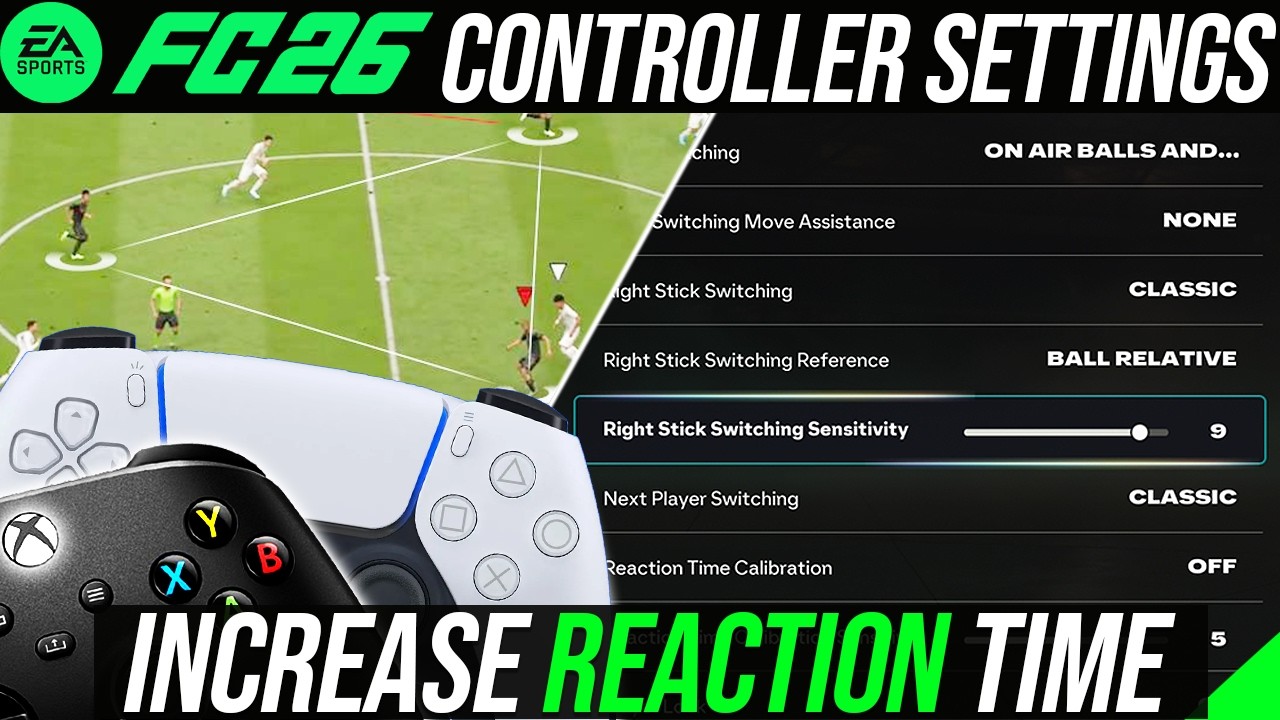
Ultimate EA FC 26 competitive controller settings breakdown and reaction time guide by NealGuides.
Shooting Settings: Precision vs Assisted
For competitive online gameplay, you must always operate on the Competitive preset. When it comes to Shot Assistance, your choice depends heavily on your current division and playstyle:
Assisted Shooting: This remains the most reliable option for the vast majority of players. If your attacking strategy heavily relies on curled efforts from outside the box—particularly when exploiting attackers equipped with the game-changer Finesse Shot PlayStyle—you will find that Assisted yields much more consistent results.
Precision Shooting: If you are an experienced player hovering above Division 2 and can remain perfectly calm inside the box, turn on Precision Shooting. It demands higher manual accuracy but offers a much higher skill ceiling for beating elite goalkeepers.

Passing and Receiver Lock Settings
Ground Pass Assistance: Keep this on Assisted. Unless you possess a top-tier pro level of manual aim, switching this to Semi will simply cost you possession.
Cross Assistance: Change this to Semi. Crossing remains highly meta, and Semi gives you total power-based control. Tapping the button hits the near post, medium power targets the centre, and high power drives the ball to the far post.
Pass Receiver Lock: Set this strictly to Late. This allows you to alter your left-stick direction at the very last millisecond before your player kicks the ball, making it vital for adapting when defenders quickly cut off your initial passing lane.
Why Trust NealGuides:
NealGuides is a gameplay expert with one of the biggest tutorial channels for EA FC 26. He has repeatedly predicted powerful META mechanics in advance and turned them into practical guides that help players improve. He is also one of the very few members part of the EA Design Council, in which he travels to EA headquarters multiple times per year to play the game and provide feedback and as a consultant.
Through his 20 years of extensive football simulation knowledge, he now focuses on helping the average player get better at the game. He has coached over 10,000s of people exclusively through his FC School, and his YouTube channel boasts over 300,000 subscribers, with over 100 million views across all platforms. Best known for his tactics, he breaks down each tactic and formation exploring the different variations and adjustments for the viewers style, all his formations that he releases are testing by him and members of different skill levels before being released.
Defending: Tactical vs Advanced
The manual nature of defending this year means your choice here is critical for protecting your backline:
Tactical Defending: If you are below Division 2, stick to Tactical. It provides a reliable, AI-supported baseline that stops you from pulling defenders out of position prematurely.
Advanced Defending: If you are in Division 1 or the Elite Division, transition to Advanced Defending. It unlocks specific physical animations, allowing you to manually initiate shoulder-to-shoulder challenges. This pairs phenomenally well with the Bruiser PlayStyle, but only use it if your defensive positioning is already fundamentally sound.
Pass Block Assistance: Leave this turned On. Turning it off does not grant more control; it simply removes an essential auto-blocking layer.
Player Switching: Master the Right Stick and L1
Right Stick Switching: Set this to Ball Relative. It statistically provides the most consistency for 99% of players, especially when dealing with server delay. Set your Right Stick Switching Sensitivity between 5 and 6 to start, and adjust based on your personal responsiveness.
Next Player Switch (L1): The post-patch logic can occasionally feel finicky. To counter this, change this setting to Closest to Ball. This ensures absolute consistency when you need to switch and press an opponent quickly.
Auto Switching: Always keep this on Air Balls and Loose Balls to stop the game from pulling you away from your CDM during midfield transitions.

Controller Hardware Adjustments
Vibration Intensity: Go into your console’s system settings and turn controller vibration completely Off. You do not want force feedback or trigger resistance fighting your fingers when trying to time a perfect shot or execute a driven pass.
Analog Sprint: Turn this Off. Keeping it off ensures your sprint input is binary (either 0% or 100%), which is far more reliable for explosive bursts of pace and controlled running jockeys (which most people struggle with defensively). However, if you are an Elite or Pro Player, and you know the risks defensively, you should consider turning analog sprint on, as you can control the speed of your dribbling variably.
Take Your Game to the Next Level
If you want to move beyond basic settings and start mastering advanced mechanics, creative runs, and pro-level gameplay analysis, join the community at learnfc.com. The structured tutorials at FC School cover everything from foundational theory on the tactical board to practical gameplay execution, backed by a complete one-month improvement guarantee.
Key Takeaways
Customise by Division: Use Tactical Defending and Assisted Shooting if you are climbing the lower ranks. Transition to Advanced Defending and Precision Shooting once you hit Division 2 or higher.
Lock Pass Decisions Late: Keeping Pass Receiver Lock on ‘Late’ is essential for outsmarting high-pressing opponents at the last second.
Fix the Switching Logic: Switch your L1 next-player logic to ‘Closest to Ball’ to stop the game from selecting random, unassigned defenders post-patch.
Optimise the Hardware: Disable all controller vibrations and turn off Analogue Sprint for predictable, responsive inputs.
If you want to stop burning through points, master these advanced mechanics on a deeper level, and access professional 1-on-1 coaching, come join the community at FC School. We stand directly behind our structured tutorials with a strict 1-month improvement guarantee: if you don’t climb divisions and improve your gameplay, you get a full refund. Zero risk, pure improvement.

Neal Guides
I am NealGuides, I run a Youtube Channel with over 300k+ Subscribers helping people get better at FC 26. We have helped millions of people improve.
I am part of the EA Design Council, in which I have played EA FC 26 early and provide feedback on the game to help shape its future.
I have coached many players in FC from the average casual, to pros, to real life footballers. If you want to improve at FC join my FC school series.
Want to improve at FC 26? Join my FC School Series




FAQ
Everything you need to know about Coaching
What is the best defending setting in FC 26?
For the majority of players below Division 2, Tactical Defending is the best option as it provides a reliable, AI-supported baseline. However, if you are in higher divisions (Division 1 or Elite), switching to Advanced Defending is the meta choice. It allows you to manually trigger specific physical tackle animations, which pairs incredibly well with the Bruiser PlayStyle.
Should I use Precision Shooting or Assisted in FC 26?
If you are an experienced player who stays calm inside the penalty area, Precision Shooting offers a much higher skill ceiling for beating elite goalkeepers. However, if your playstyle relies heavily on long-range finesse shots or you are still learning the game, keeping it on Assisted will yield far more consistent results.
Why is my right-stick switching inconsistent post-patch?
If your player switching feels erratic—especially during server delay—ensure your Right Stick Switching Reference is set to Ball Relative. This is statistically the most consistent setting for 99% of players. Additionally, keep your Right Stick Sensitivity between 5 and 6 to avoid over-aiming.
Should I turn Analogue / Analog Sprint off in FC 26?
Yes, it is highly recommended to turn Analogue/Analog Sprint Off. Disabling this setting ensures your sprint command is completely binary (either 0% or 100%). This gives you a much more reliable burst of explosive pace when attacking and allows for tighter, more predictable running jockeys when defending. However, better plays can turn Analog Sprint on, to get a variable acceleration on the movement, think of it like an accelerator/gas pedal in your car – note this does not increase your speed, it just allows you to variably control it – you have the benefit of changing speed while dribbling for a more precise flow. This is only recommended for Elite players, not every single pro player uses Analog Sprint, so the choice is up to you.
