
FC 27: Best Camera Settings for Online and Offline Play
After testing every camera angle and visual setting extensively in FC 27, Coop with custom height and zoom consistently proves to be the most competitive and reliable setup. It grants complete pitch visibility, stabilises your left stick aim, and prevents costly defensive misreads.

Table of Contents
Why Camera Settings Determine Your Win Rate
Most players leave their camera on default, yet camera angles directly govern left stick orientation and input trajectories.
When you switch between perspectives, such as from End to End or Dynamic over to Coop, the angle of the pitch relative to your thumbstick changes entirely. For instance, aiming towards the bottom left corner of the net might require an 11 o’clock left stick angle on a slanted perspective, whereas on a flat sideline view like Coop, that exact shot trajectory demands an accurate 4 o’clock input.
Minute tilts in default broadcast angles introduce subtle diagonal distortions into your:
First touches and sprint trajectories
Defensive jockey positioning and recovery runs
Ground through balls and precision passing channels
Precision shooting aim
A flatter, wider, steady top down camera eliminates perceptual errors and ensures your stick inputs remain consistent across every area of the pitch.

Check out the full video explained in detail showing you what each setting does with visual examples
Recommended Camera Settings Overview
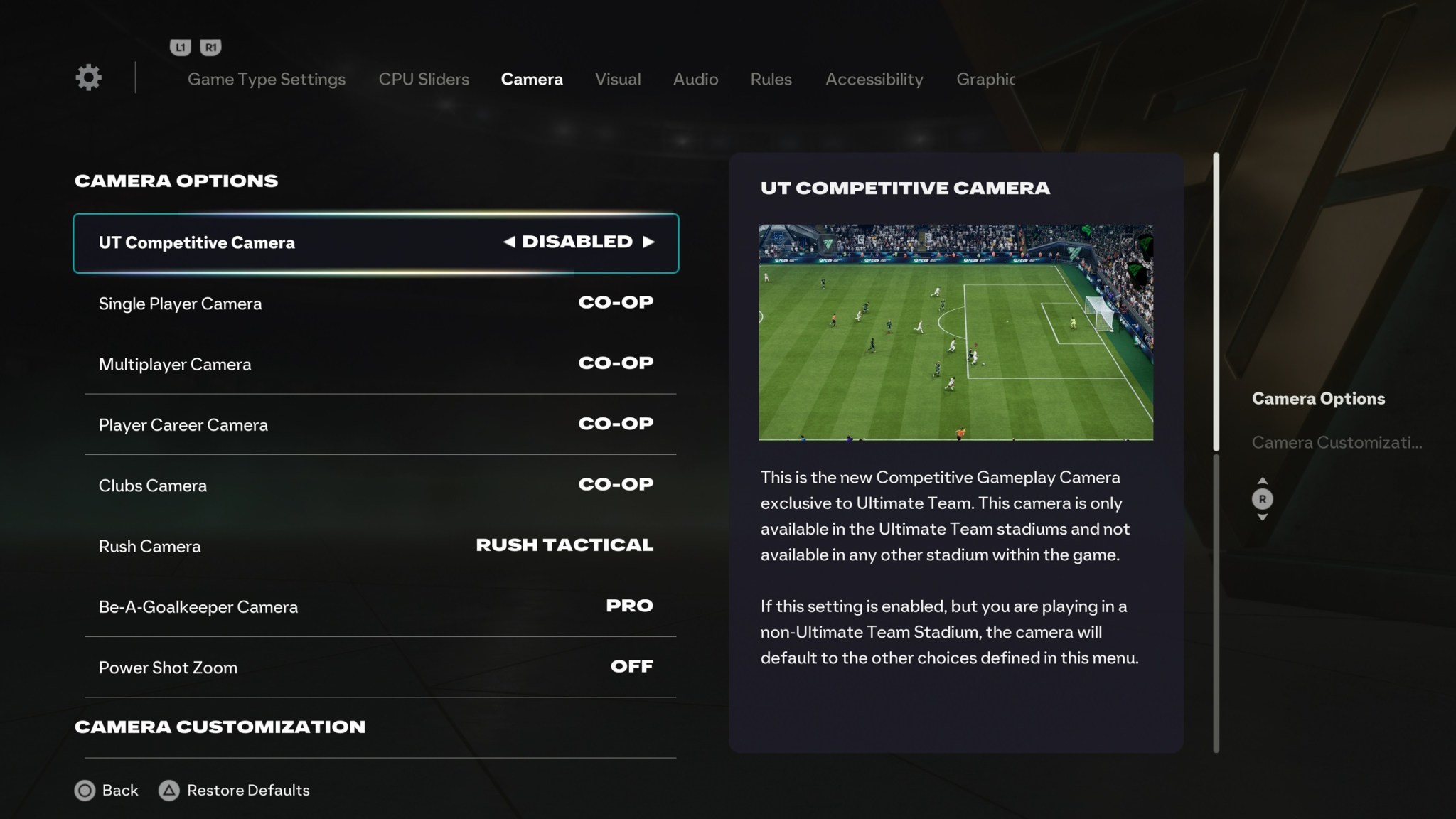
Below is the complete camera configuration optimised for competitive Ultimate Team, Clubs, and offline Career Mode matches in FC 27:
| Camera Setting | Recommended Value | Competitive Purpose |
|---|---|---|
| UT Competitive Camera | Disabled | Prevents the game from forcing default broadcast angles in online stadium matches |
| Single Player Camera | Coop | Delivers the widest field of view across the pitch |
| Multiplayer Camera | Coop | Keeps a uniform perspective across all online divisions |
| Player Career Camera | Coop | Retains tactical awareness when player locked |
| Clubs Camera | Coop | Provides full pitch vision for off ball runs |
| Rush Camera | Rush Tactical | Optimises spacing and quick transition lanes |
| Be-A-Goalkeeper Camera | Pro | Provides third person perspective for manual goalkeeper positioning |
| Custom Camera Settings | Custom | Unlocks manual Height and Zoom slider adjustments |
| Height | 20 | Maximises vertical perspective for top down lane reads |
| Zoom | 0 (Adjust for display distance) | Captures touchline to touchline width without panning delay |
| Power Shot Zoom | Off | Prevents disorienting zoom in effects during counterattack turnovers |
Why Trust NealGuides:
NealGuides is a gameplay expert with one of the biggest tutorial channels for EA FC 27. He has repeatedly predicted powerful META mechanics in advance and turned them into practical guides that help players improve. He is also one of the very few members that are part of the EA Design Council, in which he travels to EA headquarters multiple times per year to play the game and provide feedback, and as a consultant.
Through his 20 years of extensive football simulation knowledge, he now focuses on helping the average player get better at the game. He has coached tens of thousands of people exclusively through his FC School, and his YouTube channel boasts over 300,000 subscribers, with over 100 million views across all platforms.
Best known for his tactics, he breaks down each tactic and formation, exploring the different variations and adjustments for the viewer’s style. All his formations that he releases are tested by him and members of different skill levels before being released.
Height, Zoom and the Arms Length Display Rule
Whilst Height 20 remains universal because it grants a pristine top down view without camera swing, Zoom must be tailored to your display size and seating distance.
Apply the Arms Length Test: Sit in your customary gaming posture and reach forward with an outstretched arm.
| Gaming Setup | Physical Distance | Recommended Zoom | Why It Works |
|---|---|---|---|
| Esports Monitor (24 to 27 inch) | Hand easily reaches the screen | 0 | Extreme clarity; captures both touchlines without eye fatigue |
| Midsize Desk Display (32 to 43 inch) | Approximately one metre away | 3 to 5 | Keeps player models sharp whilst preserving open passing lanes |
| Living Room Television (50 inch plus) | Two to three metres away | 10 to 20 | Enlarges player animations and dribble touch points from afar |
Coop vs Tele Broadcast: The Tactical Comparison
The two predominant setups in competitive play are Coop and Tele Broadcast. Whilst many established tournament players retain Tele Broadcast purely through muscle memory, Coop provides clear tactical advantages:
| Feature | Coop (Height 20, Zoom 0) | Tele Broadcast (Default or 17 / 3) |
|---|---|---|
| Pitch Coverage | Entire pitch visible almost constantly | Demands regular glances down at the radar |
| Off Screen Runners | Visible instantly on wide overlaps | Often hidden until play crosses the halfway line |
| Passing Lane Safety | Opponent midfield pressing traps remain in plain sight | Central midfielders can sit unseen off screen |
| Pace Perception | Feels steady, calm, and deliberate | Feels brisk and heavily zoomed in |
| Defensive Tracking | Top down angle stabilises jockey movements | Angled side views distort diagonal tackles |
| Target Audience | All competitive and casual players | Elite players reliant on ingrained radar habits |
Debunking the “Coop Feels Slow” Myth: When the camera is zoomed in close, the pitch whips past quickly to keep up with the ball. On Coop, the camera barely moves because the entire pitch is already visible. Sprint speeds, ball physics, and dribbling responsiveness remain completely identical.
Competitive Visual and Display Settings
Camera placement is only one element; refining your visual display removes unnecessary visual clutter and maintains mental composure:
| Setting | Recommended Value | Advantage |
|---|---|---|
| Celebration Camera Focus | User Controlled Team | Keeps the camera on your squad after conceding, preserving composure |
| Player Shadows | Off | Removes muddy pitch contrast and dark patches across the grass |
| Stadium Shadows | Off | Eliminates severe split field shadow bands in sunny stadiums |
| Camera Shake Visuals | Off | Stops screen shudder during heavy collisions and volleys |
| Input Overlay | Single (Local Only) | Displays live stick directions to diagnose errant passes |
| HUD Indicator | Player Name (Large) | Confirms immediate player identity, stamina, and preferred foot |
| PlayStyle Indicator | On | Shows active PlayStyles such as Anticipate or Finesse live |
| Graphics Mode | Favour Resolution / High Framerate | Delivers the smoothest refresh rates and lowest input latency |
High Contrast Settings for Kit Clashes
If you encounter problematic kit clashes or struggle to differentiate the referee from your midfield players, head into head into Game Settings > Visual Tab > High Contrast Mode. Setting your squad to solid white, the opposition to deep black, and the ball to vibrant yellow guarantees rapid visual clarity regardless of stadium lighting or opposing kit selections.

How to Apply These Settings in FC 27
| Step | Menu Location | Configuration Steps | Expected Outcome |
|---|---|---|---|
| Step 1 | Main Menu > Settings | Select the gear icon located in the upper left corner of the main dashboard and open Game Settings | Opens the primary configuration dashboard |
| Step 2 | Camera Tab | Set UT Competitive Camera to Disabled. Set Single Player, Multiplayer, and Player Career to Coop. Switch Custom Camera Settings to Custom, enter Height 20 and Zoom 0, and switch Power Shot Zoom to Off | Locks in the widest pitch view and removes sudden camera zooms |
| Step 3 | Visual Tab | Set Celebration Camera Focus to User Controlled Team, change the HUD indicator to Player Name Large, and switch both Player Shadows and Stadium Shadows to Off | Eliminates pitch glare, improves player readability, and maintains mental composure |
| Step 4 | Display and Video Tab | Verify your graphics profile is set to Favour Resolution or high framerate performance mode | Provides the highest framerate output and lowest possible input delay |
Key Takeaways
Coop (Height 20, Zoom 0) remains the undisputed competitive benchmark for total pitch vision, defensive positioning, and dependable stick directions.
Camera perspective dictates left stick aiming. Default slanted views require awkward compensation on passes and shots, whereas a top down view keeps directional inputs natural.
Switching Power Shot Zoom off keeps your peripheral sight lines clear, allowing immediate vision of open runners on fast counterattack breaks.
Deactivating pitch and stadium shadows strips away harsh lighting contrasts that disguise passing lanes in bright venues.
User Controlled Team celebration focus protects your mental discipline during challenging Ultimate Team matches.
For complete visual demonstrations and side by side match footage of every single setting, explore the comprehensive walkthrough on the NealGuides YouTube channel.
Join my FC School Series. Guaranteed improvement in one month, or your money back. Videos in a structured format, everything from the fundamentals to the META. Updated regularly. If you do not get better after one month, we will refund your money, its as simple as that you have nothing to lose. Find out more information at LearnFC.com

NealGuides
NealGuides is an EA SPORTS FC tutorial creator and gameplay coach with 300,000+ YouTube subscribers. He specialises in breaking down FC gameplay, tactics, mechanics and decision-making for players from beginner through to Elite and competitive level.
Neal is a member of the EA Gameplay Design Council and has taken part in early EA SPORTS FC gameplay testing and feedback, including visits to EA. He remains independent and uses extensive gameplay testing, coaching and analysis to create his FC 27 guides.



FAQ
FC 27 Camera FAQs
Why does the Coop camera angle feel slower than Tele Broadcast in FC 27?
This sensation is entirely a visual illusion caused by perspective and field of view. When you play on a close camera like Tele Broadcast, the pitch and stadium rush past at high speed to keep up with the ball. On Coop with zero zoom, the camera barely needs to move because almost the entire pitch is already visible. Your player sprint speeds, dribble responsiveness, and ball mechanics remain completely identical. The calmer presentation actually helps you retain composure and read defensive patterns much more effectively.
What are the ideal custom camera settings for competitive online play?
The consensus competitive setup is Coop with Custom Camera Settings enabled, using Height 20 and Zoom 0. Setting the height to 20 provides an elevated top down vantage point that keeps passing lanes flat and readable. Zoom 0 keeps both touchlines on your screen at the same time, allowing you to spot wide overlapping full backs and switch play across the pitch without having to glance down at the mini map radar.
Why is turning off Power Shot Zoom considered essential?
Power Shot Zoom should be switched off because the dynamic camera lurch creates a blind spot at a critical moment. When an opponent lines up a power shot and your defender blocks it or your goalkeeper makes a save, you immediately transition into a counterattack opportunity. If the camera has zoomed tightly into the shooter, your peripheral vision is lost, making it difficult to spot open wingers or track second ball runners before possession changes hands.
How does your choice of camera angle alter left stick aiming and passing?
Left stick aiming is directly linked to the camera perspective displayed on your screen. When using default broadcast cameras that feature diagonal tilt or stadium sway, pointing your thumbstick towards goal requires slight diagonal adjustments to compensate for the skewed visual angle. With a flat, wide top down angle like Coop, your directional inputs match the visual lines of the pitch precisely, creating far more reliable precision passing and consistent shooting trajectories.
