
FC 27 Right Stick Switching Guide: Ball Relative vs Player Relative
After testing every player switching method extensively, ball relative consistently proves to be the most reliable and beginner-friendly option, giving you faster reactions, better defensive control, and far fewer costly mistakes.

Table of Contents
Defending in EA SPORTS FC 27 punishes hesitation harder than any previous title, and if your right-stick switching feels like pure roulette, no custom tactic or high-rated squad can save you. We have all experienced matches where you anticipate a passing lane perfectly, flick your right stick to step up with your defensive midfielder, and the game unpredictably hands you an off-ball fullback instead, this is due to switching, or incorrect switching.
Player switching errors mostly have mechanical errors which are down to your switching, which you can improve that we will explore. Sometimes it can also be bad gameplay, or a bad game, this is true, and sometimes myself I have also experienced a bad connection or a game where switching is bad.
Most of the time, switching error mainly happens because your right stick switch is not in the correct direction, or perhaps when you are switching, its a timing issue of selecting the wrong player. That is why I actually use ball relative, its safer, more consistent and has a much less chance of switching errors.
You may be thinking, why would I use ball relative? I had the same question. If it wasn’t my job to test the game out, I would never even have tried it.
Check out the full video explained in detail showing you what each setting does with visual examples
Right Stick Switching Errors in FC 27 - The "wrong switch"
Why Player Relative Right Stick Switching Selects the Wrong Player
The main problem with right stick switching is selecting the exact player you intended. When Player Relative is enabled, every right stick flick is calculated from the position of the player you currently control.
Imagine trying to switch from one defender to another while several teammates are standing in the same area. Even if you flick towards your intended defender, another player may be positioned at a very similar angle. The game must interpret which player you meant, and it can easily select someone beside or behind your intended target.
Changing your right stick switching sensitivity can help, but it cannot completely remove this problem. The required angle constantly changes depending on the position of the ball, your currently selected player and the teammates around you. Even a slight difference in the direction of your flick can produce a completely different switch.
For example, imagine controlling a player in the middle of the pitch and trying to select a defender on the left hand side. A left flick could select your CDM, your left back or another nearby defender because they are all positioned in roughly the same direction from your current player.
That is already difficult when your selected player is centrally positioned. When you are defending near the wing, several players can appear along an even more similar directional line. This makes it harder for the game to identify your intended target and is where many Player Relative right stick switching errors come from. See below where we go over more detail.
Option 1: Player Relative (The Default)
Player Relative right stick switching is not a bad setting. I would say it works perfectly well around 80 to 90% of the time. However, you need to develop the skill of knowing when to switch, which player to target and, most importantly, where to aim your right analog stick. The more you use the setting, the easier it becomes to understand the required angles and find consistency. You can adjust the sensitivity from 1 to 10, but I recommend starting at 5. From there, move it up or down by one point at a time until it feels comfortable.
How it works: Your currently controlled player acts as the reference point. The red marker above the player’s head shows who you are controlling. If the player you want to select is positioned towards the top right of your current player, you flick the right analog stick towards the top right. The red marker then moves to the selected player, who immediately becomes your new reference point.
The “Jumping Marker” problem: The main weakness of Player Relative occurs when your input misses the intended player by a few degrees. Imagine controlling someone in the middle of the pitch and trying to select your CDM on the right hand side. You flick the right analog stick to the right, but the game goes past your CDM and selects a defender instead. Because that defender is now your reference point, you may need to flick the right analog stick back towards the left to reach the CDM you originally wanted. You have made one movement to the right, selected the wrong player, and then had to make the opposite movement to correct it. This constantly changing reference point is what makes Player Relative switching difficult during quick defensive situations.

Option 2: Ball Relative (The Consistent Switch)
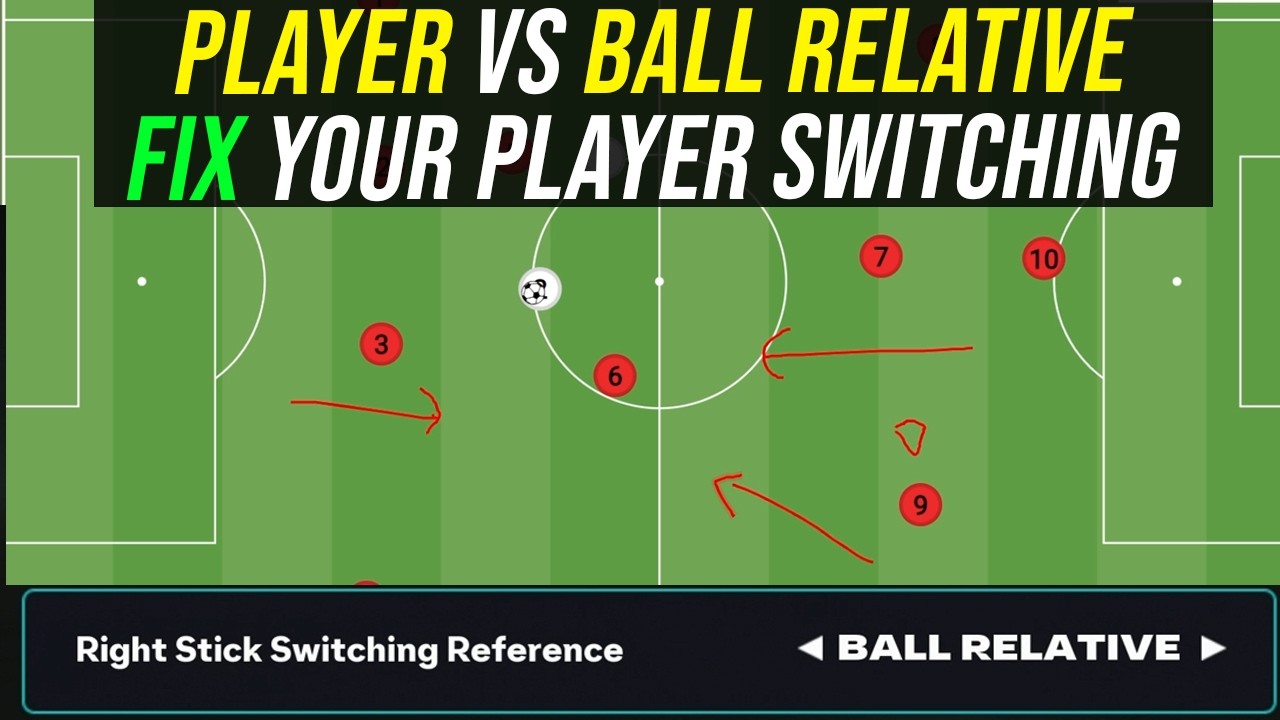
In contrast, Ball Relative uses the physical ball as the permanent reference point. It completely ignores the position of the player you are currently controlling. This is beneficial because your eyes naturally track the ball while defending, so your visual focus and switching reference remain in the same place.
How it works: Imagine the ball is in the top left corner of the screen. If you want to select a player positioned below the ball, you flick the right analog stick down. If you want the defender above the ball, you flick up. If the player is to the left, you flick towards the left hand side. The game prioritises the closest suitable player in that direction, which reduces the chance of selecting someone you did not intend to control.
Eliminating eye jumping: When defending, you are already watching the ball and the opponent carrying it. With Ball Relative, you do not need to look at your currently controlled player before calculating the direction of your next switch. The ball remains your reference point, so your eyes and your right analog stick are working from the same fixed location.
Instant recovery: Imagine the ball is in the middle of the pitch and you flick the right analog stick towards the right to select a defender. If the game selects the wrong player, you can flick in the same direction again to move to the next suitable player. You do not need to reverse the direction of your input to correct the mistake.
This makes Ball Relative much more consistent. Mistakes happen less frequently because the closest player to the ball is usually the player you want to control. When the wrong player is selected, the fixed reference point gives you a simple recovery method. Flicking in the same direction again will often take you to the player you originally wanted. However, It does have a bad point. The only negative that is on the professional scene, assuming very high level gameplay, and just to confirm, I’m not talking about elite level here, you do have more availability to press with player relative very rare situations like across the pitch, but this is so rare that the average player would never even notice in a normal game or use.

Comparison: Which Setting Fits Your Playstyle?
| Feature | Player Relative | Ball Relative (Recommended) |
|---|---|---|
| Reference Anchor | Currently controlled player | The Ball |
| Visual Focus | Split between ball and cursor | Focused 100% on the ball |
| Missed Flick Penalty | Severe | Medium |
| Pressing Ability | 9.5/10 | 9/10 |
| Adaptation Period | Immediate (Default muscle memory) | 25+ matches to rewire habits |
| Consistency Ceiling | Moderate | High |
Recommended Controller Settings for FC 27
To get the cleanest response from Ball Relative switching, align your gameplay settings with these values:
Right Stick Switching Reference: Ball Relative
Right Stick Switching Sensitivity: 6 or 7 (The default 5 can feel sluggish when selecting second-line defenders; 6–7 offers sharper snap-targeting without overshooting).
Next Player Switching: Closest to Ball
Auto Switching: On Air Balls and Loose Balls
Auto Switching Move Assistance: None
Right Stick Switching: Classic
How to Rewire Your Muscle Memory
Switching to Ball Relative will feel counterintuitive for your first few games because your thumb is accustomed to using your regular switching method, it does take a lot of time, and consistency will take a few weeks. Use this structured approach to transition quickly:
Warm up in Squad Battles: Play Kick off or Squad Battles in a low difficulty, and just practice switching players. Squad Battles is better for the flow of the game and Ultimate Team gameplay.
Focus on your hands: Consciously remind yourself and focus on where you are switching, visually seeing yourself do it can sometimes help.
Online Gameplay: The true way of practicing is going to an online game. Now, of course, you probably may lose this first game. So I would suggest if you’ve got another account in a lower division, or perhaps you haven’t played seasons and you play Ultimate Team, obviously don’t do in a rivals/weekend league match, do it like in a classic match, where there’s nothing at stake.
It does take some time, and that’s why you don’t want to go into a really competitive game mode, because you are going to lose, because defending is going to be completely different for you, and that will give the negative connotation that the setting you are using is bad.
So I would say consider keeping to use Player Relative if you do not wan that much change, but if you really do struggle defensively, most people that I’ve told to switch to ball relative, they made the change and they love it.
Why Trust NealGuides:
NealGuides is a gameplay expert with one of the biggest tutorial channels for EA FC 27. He has repeatedly predicted powerful META mechanics in advance and turned them into practical guides that help players improve. He is also one of the very few members that are part of the EA Design Council, in which he travels to EA headquarters multiple times per year to play the game and provide feedback, and as a consultant.
Through his 20 years of extensive football simulation knowledge, he now focuses on helping the average player get better at the game. He has coached tens of thousands of people exclusively through his FC School, and his YouTube channel boasts over 300,000 subscribers, with over 100 million views across all platforms.
Best known for his tactics, he breaks down each tactic and formation, exploring the different variations and adjustments for the viewer’s style. All his formations that he releases are tested by him and members of different skill levels before being released.
Key Takeaways
Player Relative vs Ball Relative: Player Relative focuses on the red marker as there reference point, ball relative uses the ball as the reference point.
Do not change if you are used to one: If you’re already used to Player Relative, it’s no point honestly changing if you’ve been playing the same way for about five years unless you’re really struggling with player switching.
Ball Relative Recovery on Misflicks: In Ball Relative, the reference point stays near the ball, allowing immediate correction with a second flick in the same direction.
Optimal Controller Adjustment: Play around with the switching sensitivity. One way of looking at it, the higher you go, the more “control you have”, but it increases more errors. Start at five and go up by one or down incrementally to find the perfect balance for yourself.
It will take some time to adapt: No matter which setting you choose, it will take some time to adapt if you change between them. Even after 20 games, it still may not be enough. So something just to consider. So don’t keep switching, stick to one.

NealGuides
NealGuides is an EA SPORTS FC tutorial creator and gameplay coach with 300,000+ YouTube subscribers. He specialises in breaking down FC gameplay, tactics, mechanics and decision-making for players from beginner through to Elite and competitive level.
Neal is a member of the EA Gameplay Design Council and has taken part in early EA SPORTS FC gameplay testing and feedback, including visits to EA. He remains independent and uses extensive gameplay testing, coaching and analysis to create his FC 27 guides.
Join my FC School Series. Guaranteed improvement in one month, or your money back. Videos in a structured format, everything from the fundamentals to the META. Updated regularly. If you do not get better after one month, we will refund your money, its as simple as that you have nothing to lose. Find out more information at LearnFC.com



FAQ
Gameplay & Settings FAQ
Why is Player Relative still the default setting if Ball Relative provides better consistency?
Player Relative has been the foundational mechanic in football simulations for over two decades. EA keeps it as the standard out-of-the-box configuration so returning players don’t experience immediate disorientation upon launching a new release.
Will switching to Ball Relative disrupt my L1 / LB switching?
No. Single-button switching (L1 on PlayStation, LB on Xbox) is governed entirely by your Next Player Switching configuration (recommended: Closest to Ball), not your right-stick reference point. You can still rely on bumper switching for immediate, closest-man pressure while using the right stick for passing-lane interception.
Why does right-stick switching occasionally select a central defender when an opponent attacks down the wing?
In Player Relative, There is normally multiple players in the way, and if you’re switching to someone across the pitch, it can be very hard for the game to understand who exactly you’re passing to. In ball-relative, you’re always selecting to a player closest to the ball, there is less chance of errors, and the ball is always in a place where you want to switch to a defender.
Is it really worth switching?
It’s only worth switching if you really struggle with right stick switching on player relative, or if you have major delay, I would consider switching to ball relative.
Give it a go, but as I said, make sure it’s over a substantial period of time. Don’t just give it a go for one day, because you need time to adapt.
